
Report generation from Review Pane
This feature allows you to generate reports directly from the Review screen based on the current grid results, applied filters and facets. You can generate the following reports from the Review grid:
-
Item List/Grid Report: Contains detailed information for items currently displayed in the grid
-
Filter Summary (Facet) Report: Provides a summary of filters and facets applied to the current results
The generated reports are processed and are available in Enhanced Reporting.
Permissions
The Generate Report button is available only to users with the Manage Reports application-level permission. The permissions can be accessed through Application tab > Roles.
Generating a report
-
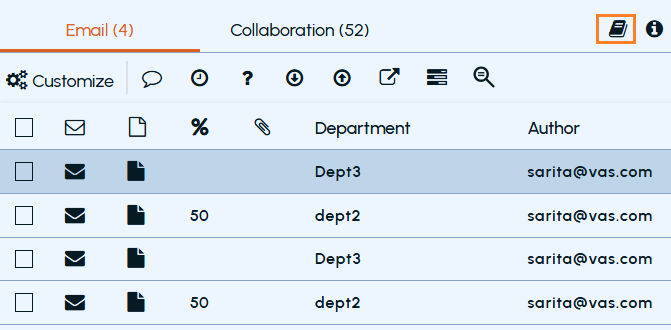
Navigate to the Review screen.
-
Click the Generate Report button.
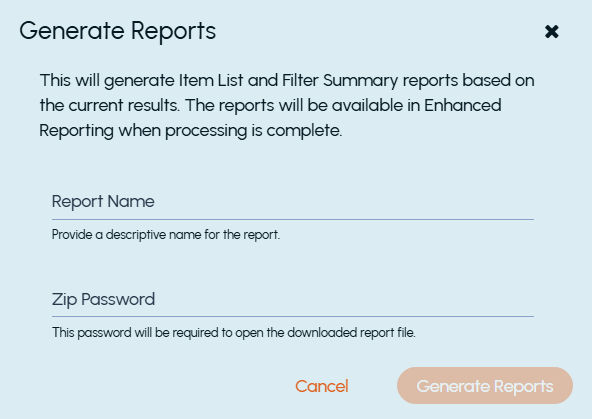
The Generate Reports window is displayed.
 |
|---|
-
Enter the required details.
-
Click Generate Reports.
A confirmation message is displayed: Your report request has been queued successfully.
-
Once processing is complete, the reports are available in Enhanced Reporting.
Report types
This feature generates the following reports:
Item List (Grid) Report
It contains detailed information for each item displayed in the grid. The grid report includes the following fields:
| - Item Row Number | - Number of Attachments |
|---|---|
| - Discovered Item ID | - Comment |
| - Department | - Policy Action |
| - Author | - Sentiment Score |
| - Subject | - All Recipients |
| - Mail Date | - Last Marked By |
| - Status | - Direction |
| - Marking Name | - Last Comment By |
| - Capture Method | - Tags Summary |
| - Message Type | - Predicted Label Summary |
| - Escalation Status | - Label Summary |
| - Escalation Owner | - KVSSaveSetID |
| - Escalated By | - Appraisal Status (based on permission) |
| - Relevance Score | - Last Appraised By (based on permission) |
Note: If the user has the Apply Appraisal Status permission (department-level), the report includes additional columns:
-
Appraisal Status
-
Last Appraised By
Filter Summary (Facet) Report
Provides a summary of facets, including:
-
Facet name
-
Item count
-
Selection status (Yes/No)
Supported Facets
The following facets are always included in the report, regardless of whether values are selected:
-
Status
-
Author
-
Archived Users
-
Escalation Status
-
Appraisal Status (based on permission)
-
Type
-
Direction
-
Predicted Label
-
Label
-
Tags
-
Tags Action
-
Last Marked By
-
Last Appraised By (based on permission)
-
Comment
-
Size
-
Capture Method
-
Escalation Owner
-
Escalated By
-
Hotword
-
Hotword Set
-
Search
-
Scheduled Search
Not Supported Facets
The following facets are included only if values are selected:
-
Capture Date
-
Date
-
Number of Attachments
-
Sentiment Score
Notes:
1\. All advanced filters, except Item ID filter, available in the Review module are supported.
2\. If the user has the Apply Appraisal Status permission (department-level), the report includes additional facets:
-
Appraisal Status
-
Last Appraised By
Report Metadata
Both reports include the following metadata:
-
Report Timezone: Indicates the timezone used for report data.
\- User timezone (if configured)
\- Otherwise, tenant timezone
\- Otherwise, defaults to PST
-
Report Timestamp: Indicates when the report was generated.
-
User: Email address of the user who requested the report.
-
Tenant: Name of the tenant for which the report was generated.
Related information