
About Arctera Surveillance reports
About Enhanced Reporting
Arctera Surveillance has introduced reporting endpoint APIs to improve reporting and analytics capabilities. To utilize these reporting endpoints, the administrator must configure them in Arctera Surveillance. Upon successful configuration, Arctera Surveillance generates a base URL and API keys to ensure secure access to the reporting endpoints. To securely access data, the primary or secondary API access keys are provided. The specified IP addresses during the configuration of these API keys determine the allowed sources from which the reporting endpoints can be accessed.
Enhanced Reporting provides a modern reporting framework that enables users to generate, schedule, and consume surveillance reports through either the Arctera Surveillance user interface or REST APIs. Reports can be generated on demand or on a schedule and consumed in analytics tools such as Microsoft Power BI, Tableau, or Microsoft Excel.
To better understand the reports generated through the Arctera Surveillance user interface or REST APIs, refer to the Sample reference reports section. It provides examples of supported report types, their parameters, and the structure of the generated report data.
Enhanced Reporting architecture
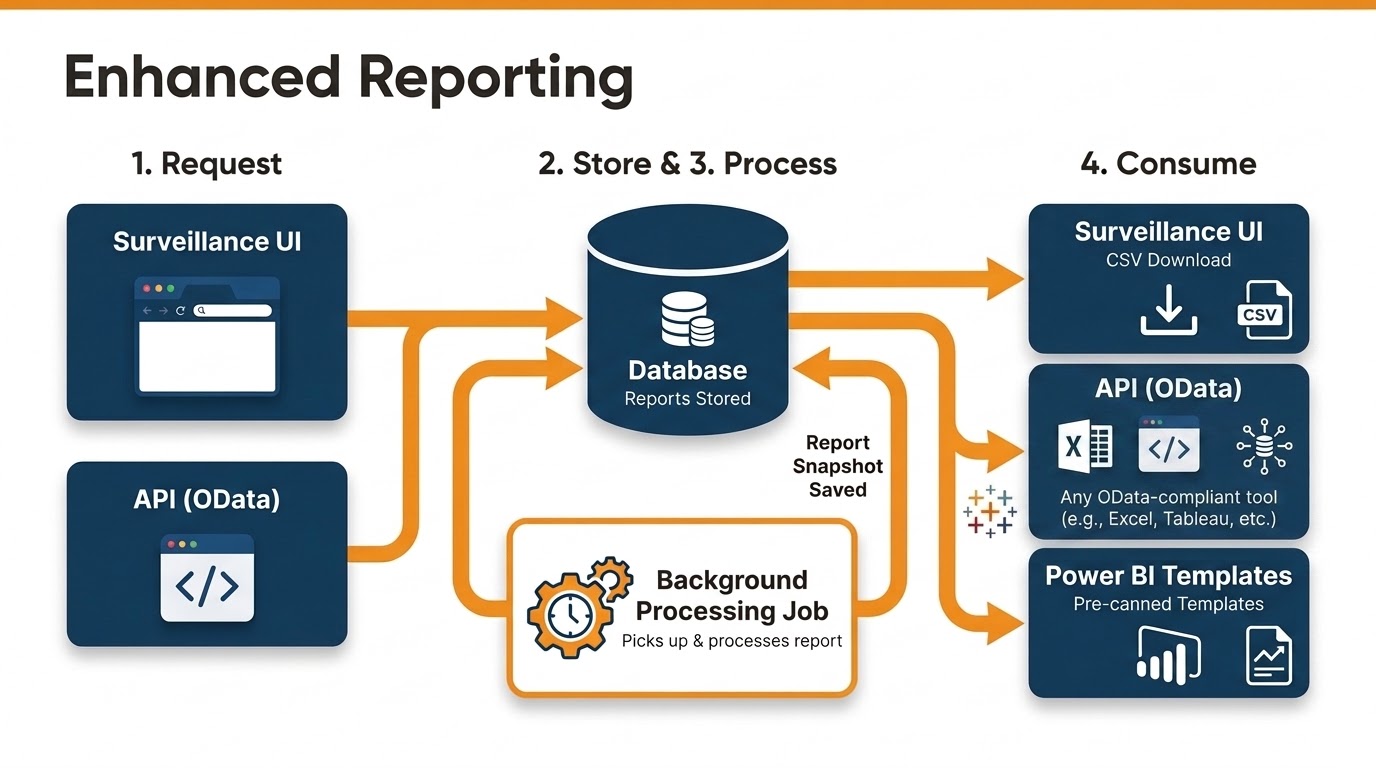
Enhanced Reporting supports both asynchronous and synchronous report processing. You can submit a report request from the Arctera Surveillance UI or by using the Submit Report Endpoints (asynchronous APIs). The request is stored in the database, where a background processing job retrieves it and generates the report. After processing, a snapshot of the report is saved in the database. You can then access the generated report by downloading it as a CSV from the Arctera Surveillance UI, retrieving it by using the View Report Endpoints (synchronous APIs), or using the provided Power BI templates for visualization.
Access methods
The following table shows all the supported report types and the methods to access them:
| Report Name | Access Method |
|---|---|
| Evidence of Review | User Interface, API |
| Item Details | User Interface, API |
| Item Hotword Metrics | User Interface, API |
| Item Metrics | User Interface, API |
| Reviewer Assessment Activity Date | User Interface, API |
| Reviewer Mapping | API |
| User Roles | User Interface, API |
| Classification Tags | API |
| Content Sources | API |
| Departments | API |
| Labels | API |
| Monitored Employees | API |
| Report Status | API |
| Roles | API |
| Searches | API |
| Users | API |
| Item Archived Metrics | API |
| Item Classification Metrics | API |
| Item Label Metrics | API |
| Reviewer Assessment Metrics | API |
| Item List and Filter Summary | Review pane |