
Reviewer Assessment Activity Date API
This topic provides information on the following:
Overview
The Reviewer Assessment Activity Date API retrieves the available reviewer and assessment activity dates for a specified report. You can use this API to obtain valid activity dates that can be used as filter criteria when generating Reviewer Assessment Activity Date reports. The API supports both synchronous and asynchronous execution methods.
General workflow
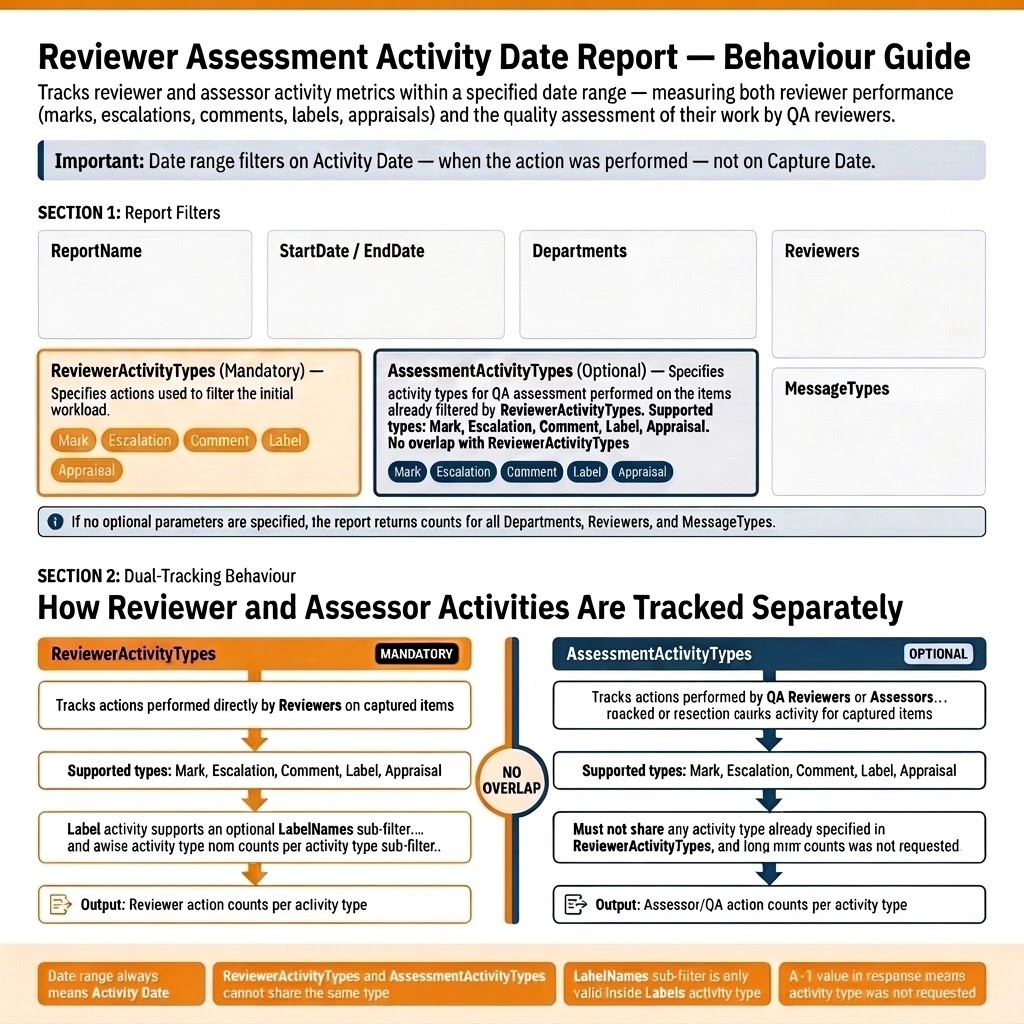
The general workflow for Reviewer Assessment Activity Date Report is as follows:
-
Report Filters:
-
ReportName, StartDate/EndDate, Departments, Reviewers, MessageTypes.
-
ReviewerActivityTypes (Mandatory): Actions by reviewers (Mark, Escalation, Comment, Label, Appraisal).
-
AssessmentActivityTypes (Optional): QA/assessor actions on those items (same types, but cannot overlap with ReviewerActivityTypes).
-
If no optional filters → returns counts for all departments, reviewers, and message types.
-
-
Tracking Behavior:
-
ReviewerActivityTypes
-
Tracks reviewer actions on items.
-
Supported types: Mark, Escalation, Comment, Label, Appraisal.
-
Labels can use a LabelNames sub-filter.
-
Output: Reviewer action counts per activity type.
-
-
AssessmentActivityTypes
-
Tracks QA/assessor actions on items already filtered by reviewer activity.
-
Supported types: Mark, Escalation, Comment, Label, Appraisal.
-
Must not overlap with ReviewerActivityTypes.
-
Output: Assessor/QA action counts per activity type.
Notes:-
Date range always means Activity Date (when the action happened).
-
Reviewer and Assessment activity types cannot overlap.
-
LabelNames sub-filter only valid inside Labels.
-
A "
-1value in response” means tracked activity type was not requested.
-
Submit Report Endpoint (asynchronous)
-
This report provides metrics for reviewer and assessment activities performed within a specified activity date range. This includes the actions performed by reviewers (mark, escalation, comment, label, appraisal) and by QA or assessors on items that reviewers have already processed. This dual-tracking allows organizations to measure both reviewer performance and the quality assessment of their work.
-
This API submits the report generation request which executes asynchronously. The result of this API contains the identifier for the report, status, and location for retrieving the report data.
-
The report identifier and locations in the result can be used to track the report generation operation.Note: The Reviewer Assessment Activity Date report filters based on the 'date the activity occurred', and not 'capture date'.
To use the Reviewer Assessment Activity Date Async API, follow the steps below:
-
Call the ReviewerAssessmentActivityDateAsync API to submit a report generation request.This asynchronous API supports GET and POST query methods. Use any of the following as needed:
-
GET https://<Reporting endpoint base URL>/OData/ReviewerAssessmentActivityDateAsync?ReportName=<Name of the report>&StartDate=<YYYY-MM-DD>&EndDate=<YYYY-MM-DD>&ReviewerActivityTypes=<Activity type> -
POST https://<Reporting endpoint base URL>/OData/ReviewerAssessmentActivityDateAsync
Sample Request-
GET https://<Reporting endpoint Base URL>/odata/ReviewerAssessmentActivityDateAsync?StartDate=2025-05-16&EndDate=2026-05-15&ReportName=RAbyActivityDate&ReviewerActivityTypes=[{"Type":"Marks"}] -
POST https://<Reporting endpoint base URL>/OData/ReviewerAssessmentActivityDateAsync
Parameter/FiltersThe following parameters/filters can be used with the ReviewerAssessmentActivityDateAsync API when invoked using the GET and POST methods. The system uses the AND operator between the filters to return the result based on the specified filters.Parameter Required Description ReportName Mandatory Specify the name of the report you want to generate. Data Type: String Limitations: - The report name can be up to a maximum of 256 characters long. - Special characters are not allowed; only alphanumeric values are permitted. StartDate Mandatory StartDate specifies the beginning of the activity date range used to filter reviewer and assessment activities. Activities performed on or after the specified date are included in the report. Data Type: DateTime Notes: 1. Format is YYYY-MM-DDThh:mm:ss. The time component is optional. If you prefer not to include the time, you can simply use the YYYY-MM-DD format. 2. StartDate must be earlier than EndDate. Limitations: EndDate Mandatory EndDate specifies the end of the activity date range used to filter reviewer and assessment activities. Activities performed on or before the specified date are included in the report. Data Type: DateTime Notes: 1. Format is YYYY-MM-DDThh:mm:ss. The time component is optional. If you prefer not to include the time, you can simply use the YYYY-MM-DD format. 2. EndDate must be later than StartDate. ReviewerActivityTypes Mandatory Specifies the reviewer activity types to include in the report. The report returns metrics only for the selected activity types. Data Type: JSON array of reviewer activity types to include. Notes: In the response, a value of -1 indicates that the corresponding activity type was not requested. It does not indicate that the activity count is zero. AssessmentActivityTypes Optional Specifies the assessment activity types to include in the report. Assessment activities represent actions performed by assessors or QA reviewers on items previously reviewed by reviewers till the current date on which the report is run. Data Type: JSON array of reviewer activity types to include. Notes: ReviewerActivityTypes and AssessmentActivityTypes cannot share the same activity type. Departments Optional Specifies the departments to which the item belongs and returns item counts for items within that department. Data Type: JSON array of integers id (identifier fields) that is Department IDs. Limitation: As an input, this API can pass maximum of 1000 Departments IDs. Note: To get the Department IDs, See Departments API. Refer to the departmentId field only. Reviewers Optional Specify a list of UserIDs for the reviewers whose details you want to retrieve. Data Type: JSON array of integers 'id'(identifier fields) that is Reviewer IDs Limitation: As an input, this API can pass maximum of 100 reviewers. Note: The valid value of the Reviewer is an ID of any user from the Arctera Surveillance User ID list. The User ID list can be fetched from the Users API endpoint. See Users API. Refer to the userId field only. MessageTypes Optional Specifies the type of captured items and returns item counts for items that have the specified message type. Data Type: JSON array of integers 'id' (identifier fields) that is MessageTypes IDs. Limitation: As an input, the Reviewer Assessment Metrics API can pass maximum 100 MessageTypes IDs on a single page. Note: If no optional parameters are specified (such as in the GET request), the Reviewer Assessment Activity Date Async API returns counts for all Departments, Reviewers, and MessageTypes.Key Considerations-
Activity type overlapping prohibited: ReviewerActivityTypes and AssessmentActivityTypes cannot share the same activity type.
-
Supported activity type aliases:
-
Mark, Marks
-
Escalation, Escalations, Escalate
-
Comment, Comments
-
Label, Labels
-
Appraisal, Appraisals, Appraise, Appraised
-
-
Activity type 'Label' behavior:
LabelNamesis only valid for Labels activity type.
Scenario 1: A basic request to submit the reportSample request:POST https://<Reporting endpoint base URL>/OData/ReviewerAssessmentActivityDateAsync
{
"ReportName":"RAbyActivityDate",
“StartDate”:"2025-05-16”,
“EndDate”:"2026-05-15”,
“ReviewerActivityTypes”:[{"Type":"Marks"}]
}Sample response: Refer to the table below for details on the attributes included in the ReviewerAssessmentMetricsAsync API response.
Name Description reportId Displays report ID. It is generated upon successful execution of API. reportName Displays report name. It is generated upon successful execution of API. reportType Displays the report type as Reviewer Assessment. reportDate Displays the date of report generation after successful execution of API. reportStatus Displays report status. For more information on statuses, see Report Status API . info Displays a message if the report request has queued successfully or not. newReportInstanceQueued Specifies whether a new report generation request has been submitted or not. The Rate Limiting feature restricts submission of multiple requests with identical input parameters if attempted within one minute. It returns the following values: True: The value is shown as True, if the new report request has been queued successfully. False: The value is shown as False, if the input parameters of the current request are identical to the parameters of the already submitted request within one minute, a new report will not be queued. As a result, the details of the existing report request are returned. reportStatusLocation Displays a URL with report ID. To view the status of this report, use the same URL. reportDataLocation Displays a URL for the location of report data. To access the report data, use the same URL. Scenario 2: A new request to submit the report for all activity typesSample request:POST https://<Reporting endpoint Base URL>/odata/ReviewerAssessmentActivityDateAsync
{
“ReportName”:"RAByActivityDateAll”,
“StartDate”:"2025-05-16”,
“EndDate”:"2026-05-15”,
“ReviewerActivityTypes”:[{"Type":"Marks"},{"Type":"Escalations"},{"Type":"Comments"},{"Type":"Labels","LabelNames": ["Label 4"]},{"Type": "Appraisals"}]
}Sample response: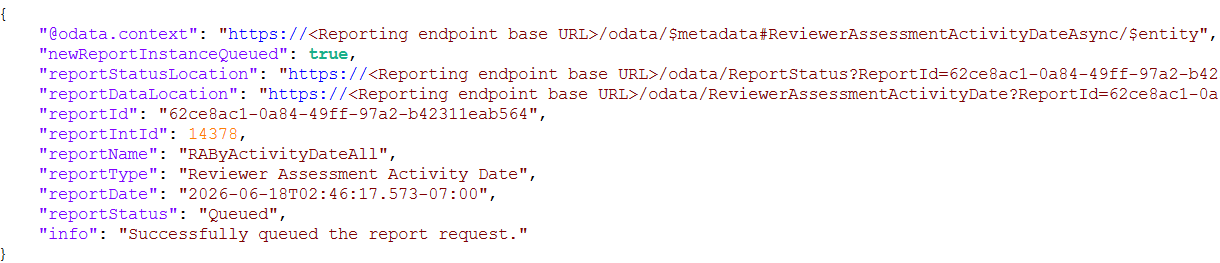 Scenario 3: A new request to submit the report when ReviewerActivityTypes and AssessmentActivityTypes share the same activity typeSample request:
POST https://<Reporting endpoint Base URL>/odata/ReviewerAssessmentActivityDateAsync
 {
 “ReportName”:"RAByActivityDateOverlap”,
 “StartDate”:"2025-05-16”,
 “EndDate”:"2026-05-15”,
 “ReviewerActivityTypes”:[{"Type":"Marks"},{"Type": "Escalations"},{"Type": "Comments"},{"Type": "Labels","LabelNames": ["Label 4"]},{"Type": "Appraisals"}],
 “AssessmentActivityTypes”:[{"Type": "Comments"}]
 }
Sample response: Scenario 4: A new request to submit the report when
LabelNamesfor activity types other than 'Label' are specifiedSample request:POST https://<Reporting endpoint Base URL>/odata/ReviewerAssessmentActivityDateAsync
{
“ReportName”:"RAByActivityDateAll”,
“StartDate”:"2025-05-16”,
“EndDate”:"2026-05-15”,
“ReviewerActivityTypes”:[{"Type":"Marks","LabelNames": ["Label 4"]},{"Type": "Escalations"},{"Type": "Comments"},{"Type":"Labels"},{"Type": "Appraisals"}]
}Sample response:
-
-
Call the ReportStatus API to get the status of the Reviewer Assessment Activity Date Async API API report. See Report Status API.
-
Once the report is ready, call the Reviewer Assessment Activity Date Async API synchronous API to get the report data from the asynchronous API.
View Report Endpoint (synchronous)
This report provides metrics for reviewer and assessment activities performed within a specified activity date range. This includes the actions performed by reviewers (mark, escalation, comment, label, appraisal) and by QA or assessors on items that reviewers have already processed.
Endpoint URL
GET https://<Reporting endpoint Base URL>/odata/ReviewerAssessmentActivityDate
Sample request
GET https://<Reporting endpoint Base URL>/odata/ReviewerAssessmentActivityDate?reportid=<ID of the ReviewerAssessmentActivityDateAsync API report>
Parameter/Filters
The following filter can be used with the ReviewerAssessmentActivityDate API when invoked using the GET method only. The system uses the AND operator between the filters to return the result based on the specified filters.
| Parameter | Required | Description |
|---|---|---|
| ReportID | Mandatory | Specify the ID of ReviewerAssessmentActivityDateAsync API report you want to view. |
Sample Scenario
GET https://<Reporting endpoint Base URL>/odata/ReviewerAssessmentActivityDate?reportid=09962382-2b67-42d1-bfee-8e6d43dd6692
Sample response
Status code - 200 OK
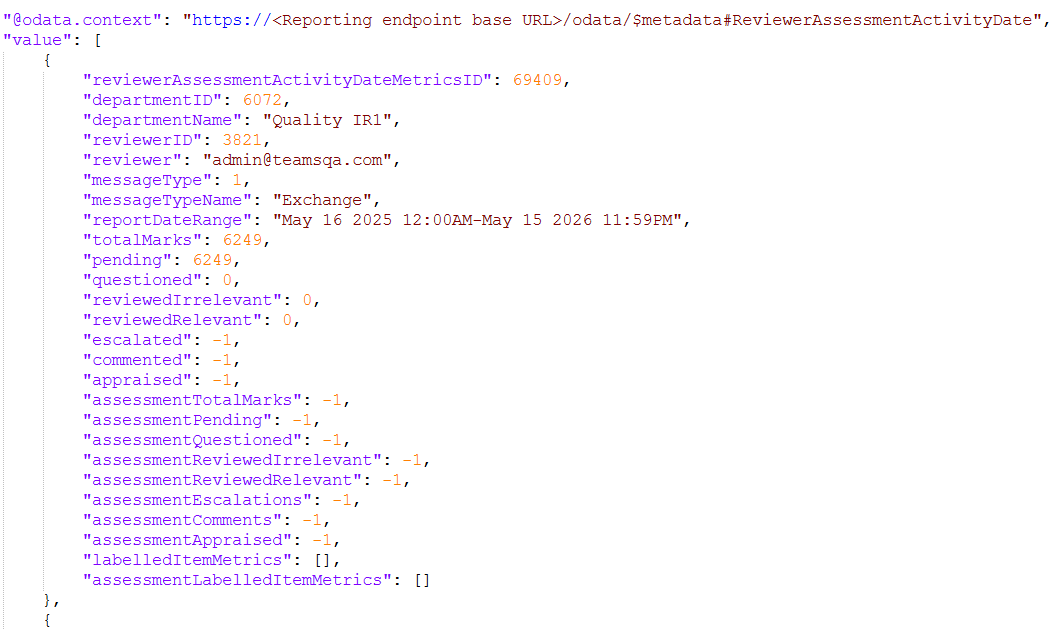
Supported OData Filters
Responses
See Responses.
Sample reference reports
Sample reports showing the report parameters and generated output are available at: Reviewer Assessment Activity Date Sample Report PDF.