
TEMPLATE- Item Label Metrics Submit Report Request
-
Open the TEMPLATE- Item Label Metrics - Submit Report Request.pbit file, and specify the following details.
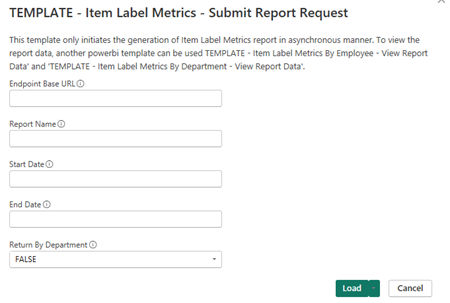
Endpoint Base URL Enter the REST API endpoint URL. For example, https://Report Name Specify a unique name for the report. Start Date Specify the earliest date from which you want to gather data captured or ingested in Insight Surveillance for your report. End Date Specify the end date until which you want to gather data captured or ingested in Insight Surveillance for your report. Return By Department By default this value is set to False . - To get the result of all labels according to monitored employees, set this value as False - To get the result of all labels according to department, set this value as True -
Click Load.
-
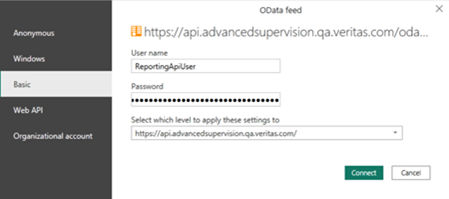
Select the required OData Feed.
The application submits the report generation request and shows the details.
-
Click Connect and choose Basic Authentication mechanism to access Reporting API.
The application prompts you several times to provide appropriate credentials when querying Reporting API for each report
-
Manually refresh the page to view the details such as Report ID, Report Name, Report Type, Report Date, Report Status, and Report Information.
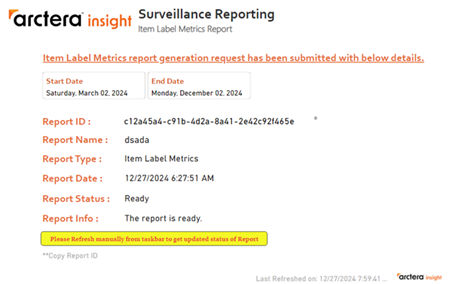
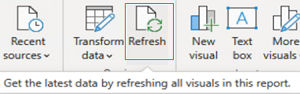
If still the entire details are not displayed, Click Refresh again as shown in the sample image below.
-
When all the details are available, copy the report ID.
Copy the Report ID to retrieve report data once the report is ready. Use this Report ID in the TEMPLATE- Item Label Metrics By Employee - View Report Data template to view monitored employees-specific report and TEMPLATE- Item Label Metrics By Department - View Report Data template to view department-specific report. Click Refresh to view the updated status of report generation.
Upon successful processing, the application displays a report for the retrieved data of the corresponding API endpoint. To help you better visualize and understand the API Endpoint reports, refer to sample images of reports.
Related information