
Evidence of Review API
This topic provides information on the following:
Overview
The Evidence of Review API generates reports that provide insights into review activity performed on captured items in Arctera Surveillance. The report helps organizations demonstrate compliance by showing how review activities have been carried out across departments or monitored employees during a specified time period.
You can use this API to analyze review coverage, identify reviewed and unreviewed items, and generate evidence required for compliance audits or regulatory reporting. The API supports both synchronous and asynchronous execution methods, allowing you to choose the most appropriate option based on the size and complexity of the report.
General workflow
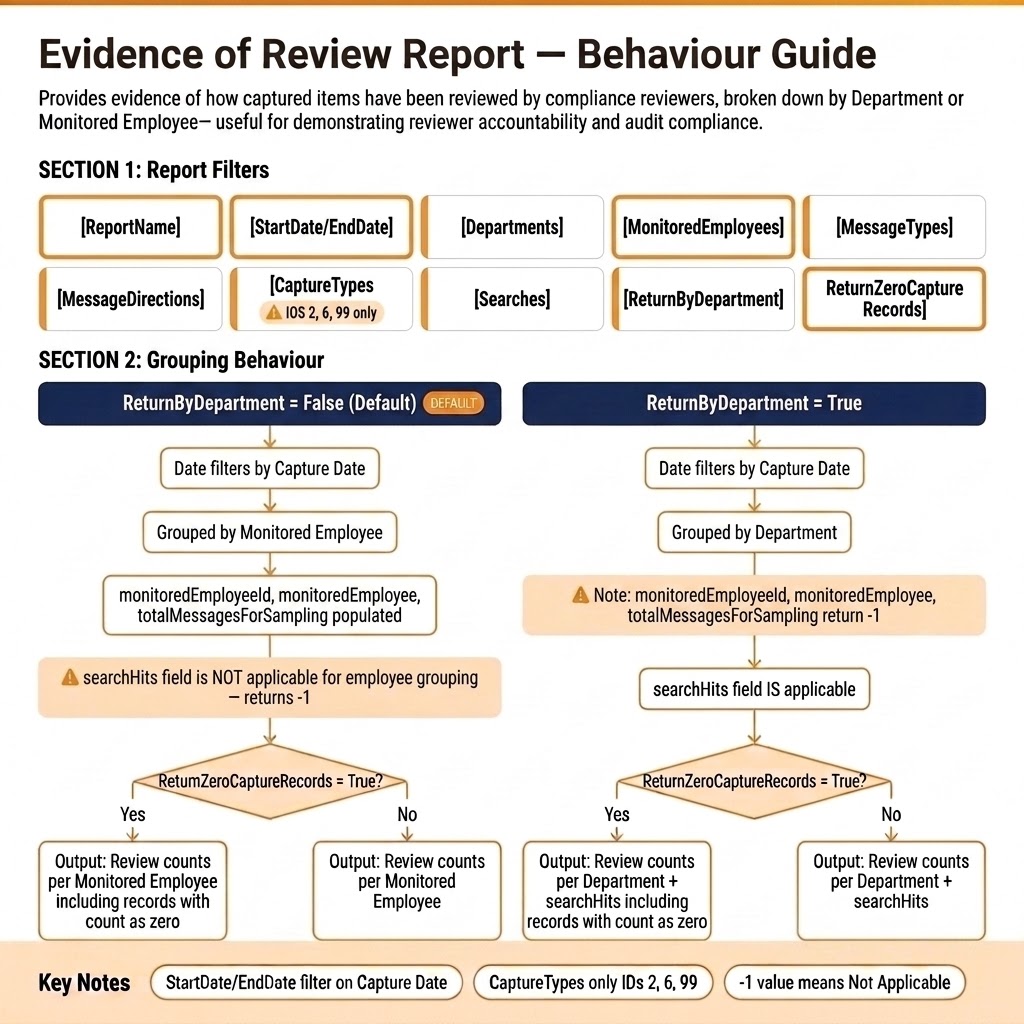
The general workflow for Evidence of Review Report is as follows:
-
Report Filters:
-
ReportName, StartDate/EndDate, Departments, MonitoredEmployees, MessageTypes, MessageDirections, Searches.
-
CaptureTypes → Only IDs 2, 6, 99 are valid.
-
ReturnByDepartment → Controls grouping.
-
ReturnZeroCaptureRecords → Decides whether zero-count records are shown.
-
-
Grouping Behavior:ReturnByDepartment = False (Default)
-
Date filters by Capture Date.
-
Grouped by Monitored Employee.
-
Fields populated: monitoredEmployeeId, monitoredEmployee, totalMessagesForSampling.
-
searchHits not applicable (returns -1).
-
If ReturnZeroCaptureRecords = True → Output includes employees with zero counts.
-
If False → Output shows only employees with review counts.
ReturnByDepartment = True-
Date filters by Capture Date.
-
Grouped by Department.
-
Employee-related fields return -1.
-
searchHits is applicable.
-
If ReturnZeroCaptureRecords = True → Output includes departments with zero counts + searchHits.
-
If False → Output shows only departments with review counts + searchHits.
Notes:-
StartDate/EndDate always filter on Capture Date.
-
Only CaptureTypes 2, 6, 99 are valid.
-
A
-1value means “Not Applicable.”
-
Submit Report Endpoint (asynchronous)
This API submits the report generation request which executes asynchronously. Result of this API contains identifier for report, status and location for retrieving the report data. | The report identifier and locations in the result can be used to track the report generation operation.
Note (only for the users who have used earlier versions of this API):
-
There were two separate reporting endpoint APIs: EvidenceOfReviewByDept and EvidenceOfReviewByUsers. However, from this release, these two APIs have been merged into one API called EvidenceOfReview. This unified API offers the same detailed reports which is conveniently accessible in one place.
-
The users field is changed to monitoredemployees.
-
A new filter Searches is added.
-
ReturnByDepartment: This parameter has been added to get the records grouped by departments and is set to False by default. When set to False, the monitoredEmployeeId, monitoredEmployee, and totalMessagesForSampling parameters are applicable, thus returning the searched values in the response.Conversely, if set to True, the monitoredEmployeeId, monitoredEmployee, and totalMessagesForSampling parameters are not applicable, thus returning the -1 value in the response.
-
ReturnZeroCaptureRecords: This parameter has been added and is set to False by default. When set to False, parameters with a result count of zero will not be displayed in the output. Conversely, if set to True, parameters with a result count of zero will be included in the output.
-
The Reviewed output parameter has been removed and replaced with the ReviewedRelevant and ReviewedIrrelevant parameters.However, the Unreviewed output parameter has been retained. In addition, the UnreviewedRelevant and UnreviewedIrrelevant parameters are added.
-
In the response, the
-1value for searchHits signifies Not Applicable.
To use the EvidenceOfReviewAsync API, follow the steps below:
-
Call the EvidenceOfReviewAsync API to submit report generation request.This asynchronous API supports GET and POST query methods. Use any of the following as needed:
GET https://<Reporting endpoint Base URL>/odata/EvidenceOfReviewAsyncPOST https://<Reporting endpoint Base URL>/odata/EvidenceOfReviewAsyncSample input-
GET https://<Reporting endpoint Base URL>/odata/EvidenceOfReviewAsync?ReportName= <name of report>& StartDate=<YYYY-MM-DD>&EndDate=<YYYY-MM-DD> &Departments=[<DeptID1>,<DeptID2>,...]&MessageTypes=[<MessageTypeID1>,<MessageTypeID2>,...]&MessageDirections =[<MessageDirectionID1>,<MessageDirectionID2>, ...] & CaptureTypes=[<CaptureTypeID1>, <CaptureTypeID2>,...]&ReturnByDepartment=True&ReturnZeroCaptureRecords=False -
GET https://<Reporting endpoint Base URL>/odata/EvidenceOfReviewAsync?ReportName=TestReport1&StartDate=2024-01-01&EndDate=2024-06-30 &Departments=[101, 102] &MessageTypes=[1,7]&MessageDirections=[1,2] &CaptureTypes=[6,99]&ReturnByDepartment=True&ReturnZeroCaptureRecords=False -
POST https://<Reporting endpoint Base URL>/odata/EvidenceOfReviewAsync
Parameter/FiltersThe following filters can be used with the EvidenceOfReviewAsync API when invoked using the GET and POST methods. The system uses the AND operator between the filters to return the result based on the specified filters.Parameter Required Description ReportName Mandatory Specify a name of the report. StartDate Mandatory StartDate is the date on which items are captured or ingested in Arctera Surveillance is recorded as the CaptureDate for that item. This filter specifies the start date for returning count of items whose CaptureDate is greater than or equal to this start date. Data Type: Date in the YYYY-MM-DD format that is StartDate. EndDate Mandatory This filter specifies the end date for returning count of items whose CaptureDate is less than or equal to this date. Data Type: Date in the YYYY-MM-DD format that is EndDate. MessageTypes Optional Specifies the type of captured items and returns item counts for items that have the specified message type. Data Type: JSON array of integers 'id' (identifier fields) that is MessageType IDs. Limitation: As an input, this API can pass maximum 100 MessageType IDs. Departments Optional Specifies the departments to which the captured item belongs and returns item counts for items within that department. Data Type JSON array of integers 'id' (identifier fields) that is Department IDs. Limitation As an input, this API can pass maximum of 1000 Departments IDs. Note - To include results for all departments of a specified customer in a report, do not specify any department IDs in a query. - To include results for specific departments of a specified customer in a report, specify department IDs in the query. MonitoredEmployees Optional This field specifies the monitored employee IDs for which the report has to be generated. For example, if a department has 10 monitored employees but only 2 are specified in this filter, the report will include item counts for only those 2 monitored employees. Note: - To include all monitored employees in a report, do not specify any monitored employee IDs in a query. - To include results for specific monitored employees of a specified customer in a report, specify monitored employee IDs in the query - The valid values of monitored employees are the IDs of any monitored employee from the Arctera Surveillance MonitoredEmployee ID list. This ID list can be fetched from the MonitoredEmployee API endpoint. See Monitored Employees API . Refer to the MonitoredEmployeeId field only. Data Type: Integer ID of the user. MessageDirections Optional Specifies whether the item was sent/received from within the organization or from an external source and returns item counts for items that have the specified message direction. Data Type: JSON array of integers 'id'(identifier fields) that is MessageDirection IDs. Limitation: As an input, this API can pass maximum 5 MessageDirection IDs. CaptureTypes Optional Specifies the mode/technique used to capture the item in Arctera and returns item counts for items with the specified capture type. Data Type: JSON array of integers 'id'(identifier fields) that is CaptureType IDs. Limitation: - As an input, this API can pass maximum 10 CaptureTypes IDs. - Only CaptureTypes IDs 2, 6, and 99 are supported. ReturnByDepartment Mandatory to get department wise report This parameter value is set to False by default. - When set to False, it returns the count at monitored employee level (that is grouping by monitored employees). The monitoredEmployeeId, monitoredEmployee, and totalMessagesForSampling parameters are applicable, and return the corresponding values in the response. - When set to True, it returns the evidence of review count at department level (that is grouping by departments). The monitoredEmployeeId, monitoredEmployee, and totalMessagesForSampling parameters are not applicable, and return the -1 value in the response. ReturnZeroCaptureRecords Mandatory to get monitored employees wise report This parameter value is set to False by default. - When set to False, parameters with a result count of zero will not be displayed in the output. - When set to True, parameters with a result count of zero will be included in the output. Searches Optional Specifies IDs of the searches. Note: If the IDs of the parent searches are specified, the generated report includes result for corresponding child searches. In the response, the -1 value for searchHits signifies Not Applicable. The searchHits field is applicable to Evidence Of Review By Department only and not applicable for Evidence Of Review By Monitored Employee. Scenario 1: New request to submit a reportSample input for Return By Monitored Employee: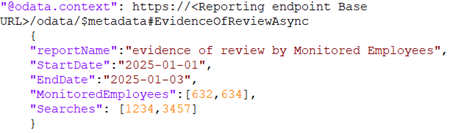 Sample input for Return By Department:
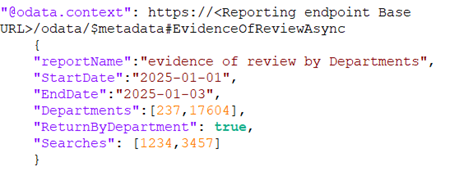 Sample response:
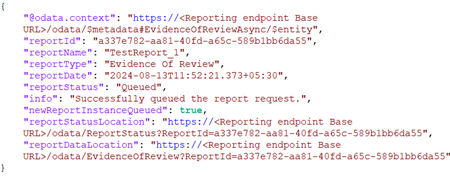 Note: The API response for Item Details, Item Metrics, and Evidence of Review reports also include the input parameters specified during report generation as shown in the image below.
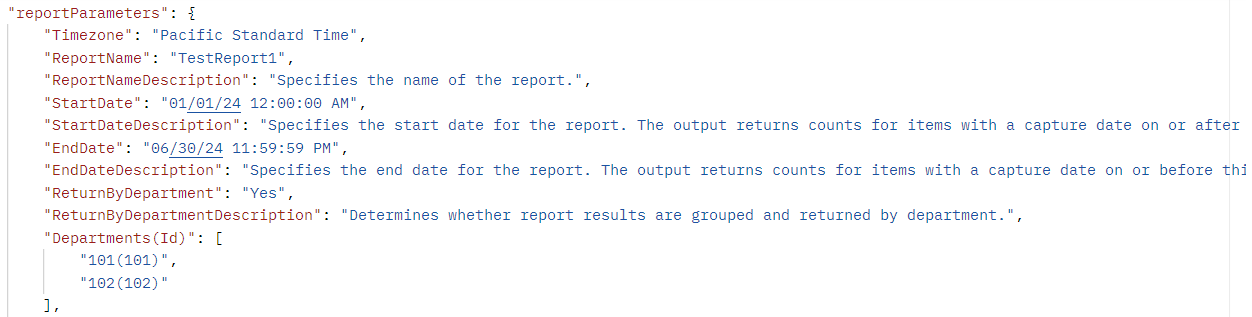 Refer to the table below for details on the attributes included in the EvidenceOfReviewAsync API response.
Name Description reportId Displays report ID. It is generated upon successful execution of API. reportName Displays report name. It is generated upon successful execution of API. reportType Displays the report type as Evidence Of Review. reportDate Displays the date of report generation after successful execution of API. reportStatus Displays report status. For more information on statuses, see Report Status API . info Displays a message if the report request has queued successfully or not. newReportInstanceQueued Specifies whether a new report generation request has been submitted or not. The Rate Limiting feature restricts submission of multiple requests with identical input parameters if attempted within one minute. It returns the following values: True: The value is shown as True, if the new report request has been queued successfully. False: The value is shown as False, if the input parameters of the current request are identical to the parameters of the already submitted request within one minute, a new report will not be queued. As a result, the details of the existing report request are returned. reportStatusLocation Displays a URL with report ID. To view the status of this report, use the same URL. reportDataLocation Displays a URL for the location of report data. To access the report data, use the same URL. Scenario 2: The same request has been submitted again within one minuteSample response: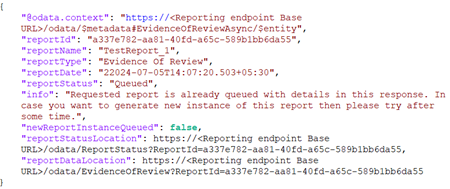
-
-
Call the ReportStatus API to get the status of asynchronous API report. See Report Status API.
-
Once the report is ready, call the EvidenceOfReview synchronous API to retrieve the report data from the asynchronous API.
View Report Endpoint (synchronous)
This API gets the total messages count, captured message count and the marking count, (that is count of messages marked as reviewed / unreviewed / questioned / pending) per monitored employee. The counts are calculated for the specified date range and using the specified filters.
Endpoint URL
GET https://<Reporting endpoint base URL>/odata/EvidenceOfReview
Sample requests
GET https://<Reporting endpoint Base URL>/odata/EvidenceOfReview?reportid=<ID of the EvidenceOfReviewAsync API report>
GET https://<Reporting endpoint Base URL>/odata/EvidenceOfReview?reportid=a337e782-aa81-40fd-a65c-589b1bb6da55
Parameter/Filters
The following filters can be used with the EvidenceOfReview API when invoked using the GET method. The system uses the AND operator between the filters to return the result based on the specified filters.
| Parameter | Required | Description |
|---|---|---|
| ReportID | Mandatory | Specify the ID of report you want to view. |
Note (only for the users who have used earlier versions of this API):
-
There were two separate reporting endpoint APIs: EvidenceOfReviewByDept and EvidenceOfReviewByUsers. However, from this release, these two APIs have been merged into one API called EvidenceOfReview. This unified API offers the same detailed reports which is conveniently accessible in one place.
-
The users field is changed to monitoredemployees.
-
In the response, the -1 value for SearchHits signifies Not Applicable.
Sample responses
Scenario 1: Return By Department
Status code: 200 OK
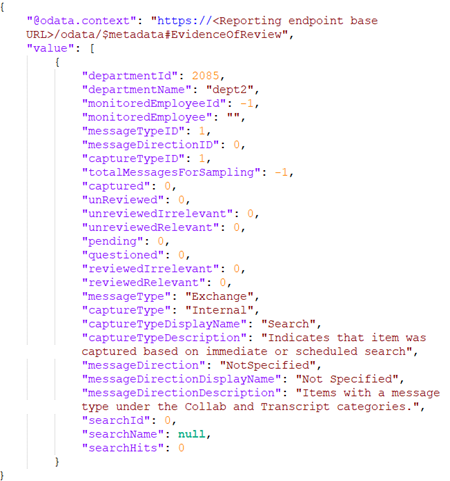
Scenario 2: Return By Monitored Employees
Status code: 200 OK
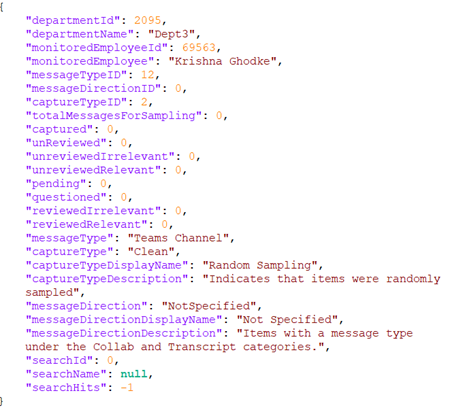
Note: The API response for Item Details, Item Metrics, and Evidence of Review reports also include the input parameters specified during report generation as shown in the image below.
Supported OData filters
Supported reporting endpoint API filters and their values
Responses
See Responses.
Sample reference reports
Sample reports showing the report parameters and generated output are available at: Evidence of Review Sample Report PDF.