
Working with AI Assistant
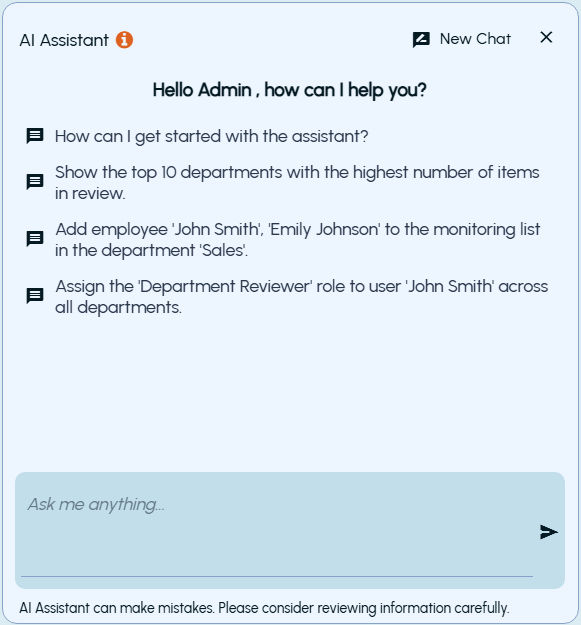
AI Assistant Interface
 |
|---|
The AI Assistant pane includes:
-
New Chat: Starts a new conversation.
-
Close: Closes the assistant window.
-
Predefined prompts: Common queries that can be selected and executed.
-
Input box: Allows user to enter custom queries.
-
Disclaimer: Indicates that AI Assistant may produce inaccurate responses and users should verify the information.
Interacting with AI Assistant
To interact with AI Assistant
-
Open the AI Assistant.
-
Select a predefined prompt or enter a query in the input box.
-
Selecting a predefined prompt inserts it into the input field.
-
User must submit the query to execute it.
-
Users can enter custom queries in natural language.
-
-
Click the send icon to submit the request.
-
The AI Assistant processes the request and displays the response.
Input Guidelines
-
Maximum character limit for a query: 2,000 characters
-
If the limit is exceeded, the following message is displayed:
Related information
Maximum character limit of 2,000 reached
Chat History Retention
-
Chat history is preserved when:
\- The assistant window is closed and reopened
\- The user navigates to other pages within the application
-
Chat history is cleared when:
\- A new chat is started
\- The browser is refreshed
\- The user logs out
Note: The AI Assistant displays the complete chat history for the current session in the UI. However, it uses only the last seven user queries and their corresponding responses as context when processing subsequent queries.
Limitations
-
AI Assistant supports only specific modules and actions.
-
Requests outside the supported scope may not return results.
-
The assistant may not answer general or unrelated queries.