
Item Archived Metrics Async API
| ItemArchivedMetricsAsync | This API submits the report generation request which executes asynchronously. The result of this API contains the identifier for the report, status, and location for retrieving the report data. |
|---|---|
| The report identifier and locations in the result can be used to track the report generation operation. | |
To use the ItemArchivedMetricsAsync API, follow the steps below:
-
Call the ItemArchivedMetricsAsync API to submit a report generation request.
GET https://<Reporting endpoint base URL>/OData/ItemArchivedMetricsAsync? IndexStartDate=<YYYY-MM-DD>&IndexEndDate=<YYYY-MM-DD>&ReportName=<Name of the report>
Sample Input
GET https://<Reporting endpoint base URL>/OData/ItemArchivedMetricsAsync? IndexStartDate=2024-01-01&IndexEndDate=2024-05-31&ReportName=TotalCountReport
ItemArchivedMetricsAsync - URL Parameter/Filters
The following parameters/filters can be used with the ItemArchivedMetricsAsync API when invoked using the GET method. The system uses the AND operator between the filters to return the result based on the specified filters.
| ReportName | Mandatory | Specify the name of the report you want to generate. |
|---|---|---|
| Limitations | ||
| - The report name can be up to a maximum of 256 characters long. | ||
| - Special characters are not allowed; only alphanumeric values are permitted. | ||
| IndexStartDate | Mandatory | IndexStartDate refers to the start date on which the items got archived. |
| Specify the start date to return the count of items with archive date on or after this date. | ||
| Data Type | ||
| Date in the YYYY-MM-DD format that is IndexStartDate. | ||
| Limitations | ||
| For the cloud-based application, a maximum of one year duration is allowed. | ||
| IndexEndDate | Mandatory | IndexEndDate refers to the end date to return the count of archived items with Index End Date on or before this date. |
| Specify the end date to return the count of items with capture date on or before this date. | ||
| Data Type | ||
| Date in the YYYY-MM-DD format that is IndexEndDate. | ||
| Limitations | ||
| For the cloud-based application, a maximum of one year duration is allowed. |
Scenario 1: New request to submit a report.
Sample input:
GET https://<Reporting endpoint base URL>/odata/ItemArchivedMetricsAsync? ReportName=TotalCountReport&IndexStartDate=2024-01-01& IndexEndDate=2024-05-31
Sample response:
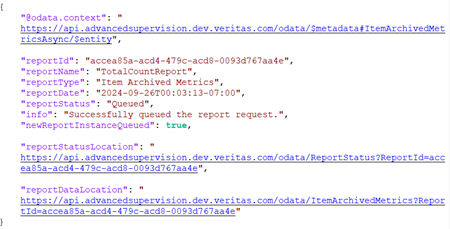 |
|---|
| Name | Description |
|---|---|
| reportId | Displays report ID. It is generated upon successful execution of API. |
| reportName | Displays report name. It is generated upon successful execution of API. |
| reportType | Displays the report type as Item Archived Metrics . |
| reportDate | Displays the date of report generation after successful execution of API. |
| reportStatus | Displays report status. For more information on statuses, See Report Status API . |
| info | Displays a message if the report request has queued successfully or not. |
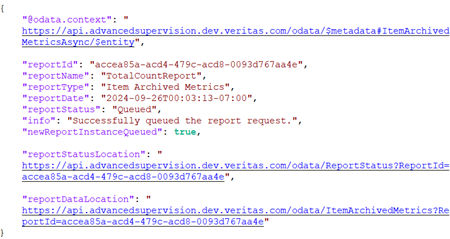
| newReportInstanceQueued | Specifies whether a new report generation request has been submitted or not. The Rate Limiting feature restricts submission of multiple requests with identical input parameters if attempted within one minute. |
| It returns the following values: | |
| True : The value is shown as True , if the new report request has been queued successfully. | |
| False : The value is shown as False , if the input parameters of the current request are identical to the parameters of the already submitted request within one minute , a new report will not be queued. As a result, the details of the existing report request are returned. | |
| reportStatusLocation | Displays a URL with report ID. |
| To view the status of this report, use the same URL. | |
| reportDataLocation | Displays a URL for the location of report data. |
| To access the report data, use the same URL. |
Scenario 2: The same request has been submitted again within one minute.
Sample response:
 |
|---|
-
Call the ReportStatus API to get the status of the ItemArchivedMetricsAsync API report. See Report Status API.
-
Once the report is ready, call the ItemArchivedMetrics API to get the report data from the asynchronous API. See Item Archived Metrics API.
Related information