
Item Metrics API
| Item Metrics- List by filter | This report provides the details of items captured in Arctera Surveillance within a specified date range. |
|---|---|
Item Metrics- List by filter
GET https://<Reporting endpoint base URL>/odata/ItemMetrics
Sample request
-
GET https://<Reporting endpoint Base URL>/odata/ItemMetrics?reportid=<ID of the ItemMetricsAsync API report>
ItemMetricsAPI - URL Parameter/Filters
The following filters can be used with the ItemMetrics API when invoked using the GET method only. The system uses the AND operator between the filters to return the result based on the specified filters.
| ReportID | Mandatory | Specify the ID of ItemMetrics API report you want to view. |
|---|---|---|
Scenario 1
GET https://<Reporting endpoint Base URL>/odata/ItemMetrics?
ReportId=0db229b3-10d4-425f-826f-e515fb667688
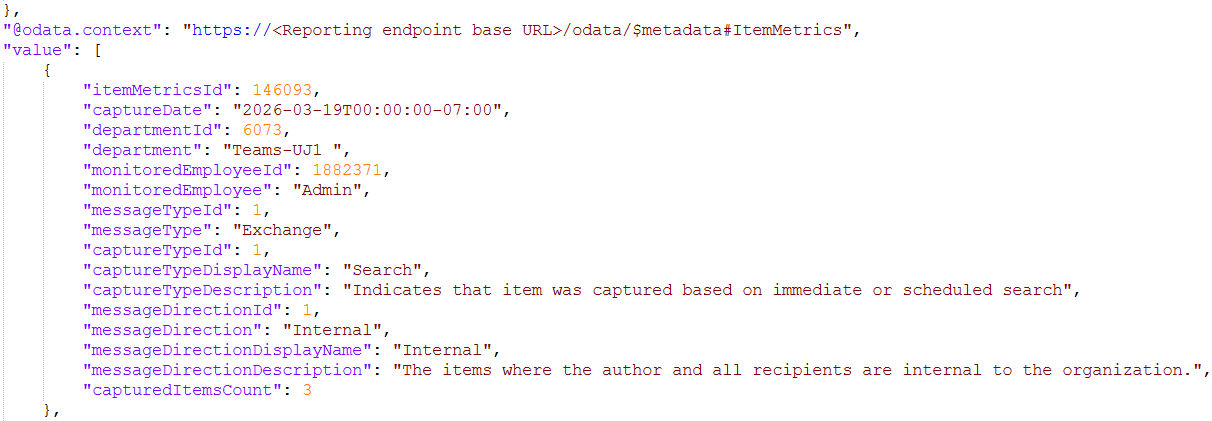
Sample response:
Status code: 200 OK
 |
|---|
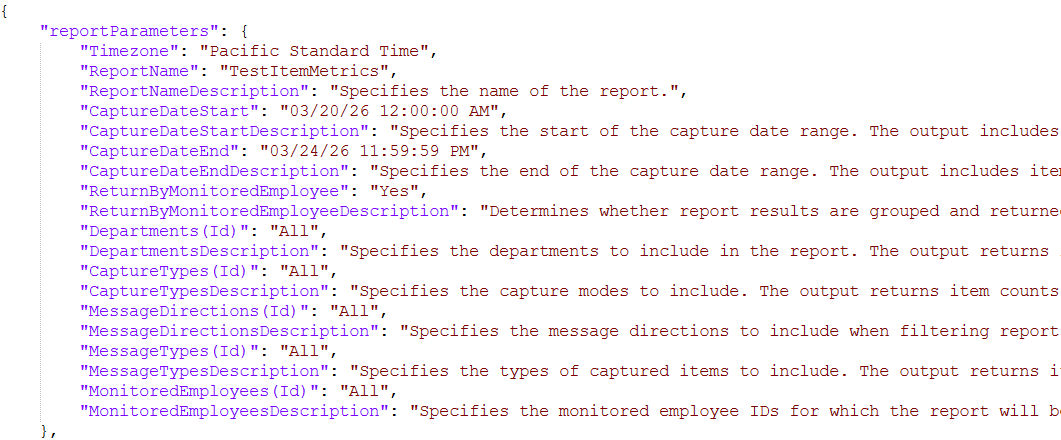
Note: The API response for Item Details, Item Metrics, and Evidence of Review reports also include the input parameters specified during report generation as shown in the image below.
 |
|---|
Supported OData Filters
Responses
See Responses.
Related information