
Reviewer Assessment Metrics Async API
| Reviewer Assessment Metrics Async | This API submits the report generation request which executes asynchronously. The result of this API contains the identifier for the report, status, and location for retrieving the report data. |
|---|---|
| This report displays metrics for actions performed by reviewers within the Arctera Surveillance application. These actions include marking, labeling, escalating, and appraising items. The report is intended to assess reviewer performance based on the accuracy of their reviews. | |
| The report identifier and locations in the result can be used to track the report generation operation. | |
To use the Reviewer Assessment Metrics Async API, follow the steps below:
-
Call the Reviewer Assessment Metrics Async API to submit a report generation request.
This asynchronous API supports GET and POST query methods. Use any of the following as needed:
-
GET https://<Reporting endpoint base URL>/OData/ ReviewerAssessmentMetricsAsync?ReportName=<Name of the report>&StartDate=<YYYY-MM-DD>& EndDate=<YYYY-MM-DD> -
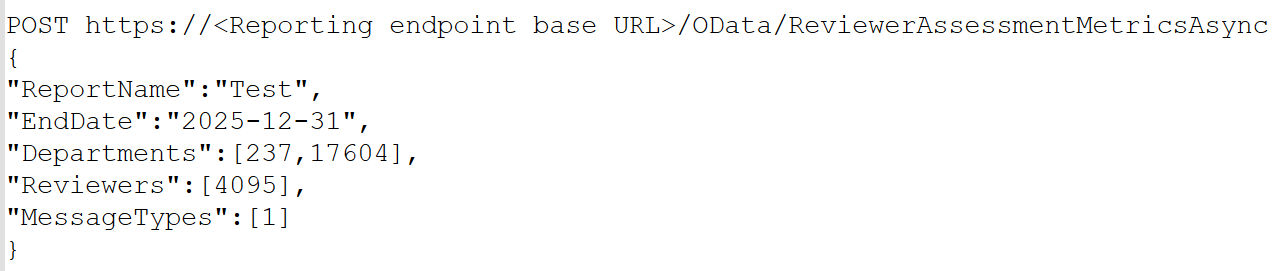
POST https://<Reporting endpoint base URL>/OData/ ReviewerAssessmentMetricsAsync
Sample Request
-
GET https://<Reporting endpoint Base URL>/odata/ ReviewerAssessmentMetricsAsync?StartDate=2025-04-23&
EndDate=2025-05-31&ReportName=SampleReviewerAssessReport
-
POST https://<Reporting endpoint base URL>/OData/ReviewerAssessmentMetricsAsync
Reviewer Assessment Metrics Async API - URL Parameter/Filters
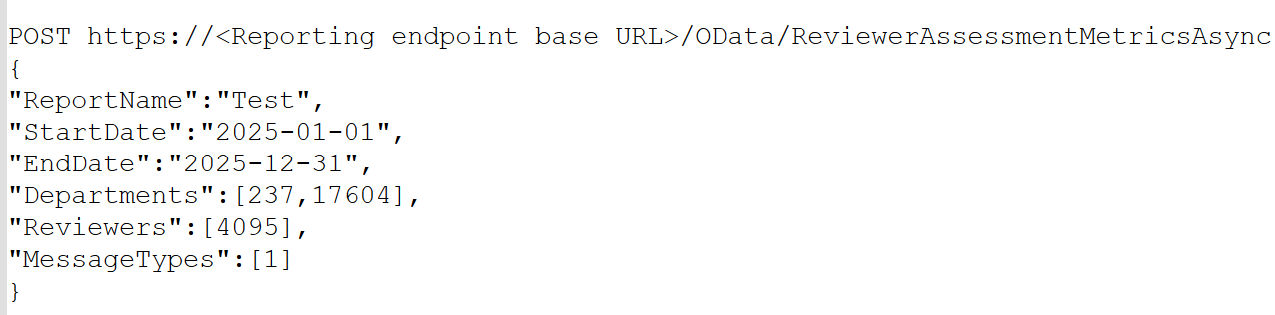
The following parameters/filters can be used with the Reviewer Assessment Metrics Async API when invoked using the GET and POST methods. The system uses the AND operator between the filters to return the result based on the specified filters.
| ReportName | Mandatory | Specify the name of the report you want to generate. |
|---|---|---|
| Data Type : String | ||
| Limitations | ||
| - The report name can be up to a maximum of 256 characters long. | ||
| - Special characters are not allowed; only alphanumeric values are permitted. | ||
| StartDate | Mandatory | StartDate refers to the beginning of the datetime used to filter items in Arctera Surveillance. It specifies emails with a 'sent date' greater than or equal to the specified value. |
| Data Type : DateTime | ||
| Notes : | ||
| 1. Format is YYYY-MM-DDThh:mm:ss. | ||
| The time component is optional. If you prefer not to include the time, you can simply use the YYYY-MM-DD format. | ||
| 2. StartDate must be earlier than EndDate. | ||
| Limitations | ||
| For the cloud-based application, a maximum of one year duration is allowed. | ||
| EndDate | Mandatory | EndDate refers to the end of the datetime used to filter items in Arctera Surveillance. It specifies emails with a 'sent date' less than or equal to the specified value. |
| Data Type : DateTime | ||
| Notes : | ||
| 1. Format is YYYY-MM-DDThh:mm:ss. | ||
| The time component is optional. If you prefer not to include the time, you can simply use the YYYY-MM-DD format. | ||
| 2. EndDate must be later than StartDate. | ||
| Limitations | ||
| For the cloud-based application, a maximum of one year duration is allowed. | ||
| Departments | Optional | Specifies the departments to which the item belongs and returns item counts for items within that department. |
| Data Type : JSON array of integers id (identifier fields) that is Department IDs. | ||
| Limitation | ||
| As an input, this API can pass maximum of 1000 Departments IDs. | ||
| - To include results for all departments of a specified customer in a report, do not specify any department IDs in a query. | ||
| - To include results for specific departments of a specified customer in a report, specify department IDs in the query. | ||
| Note: To get the Department IDs, SeeDepartments API. Refer to thedepartmentIdfield only. | ||
| Reviewers | Optional | Specify a list of UserIDs for the reviewers whose details you want to retrieve. |
| Data Type : JSON array of integers 'id'(identifier fields) that is Reviewer IDs | ||
| Limitation | ||
| As an input, this API can pass maximum of 100 reviewers. | ||
| Note: The valid value of the Reviewer is an ID of any user from the Arctera Surveillance User ID list. The User ID list can be fetched from the Users API endpoint. SeeUsers API. Refer to theuserIdfield only. | ||
| MessageTypes | Optional | Specifies the type of captured items and returns item counts for items that have the specified message type. |
| Data Type : JSON array of integers 'id' (identifier fields) that is MessageTypes IDs. | ||
| Limitation | ||
| As an input, the Reviewer Assessment Metrics API can pass maximum 100 MessageTypes IDs on a single page. |
Note: If no optional parameters are specified (such as in the GET request), the Reviewer Assessment Metrics API returns counts for all Departments, Reviewers, and MessageTypes.
Primary actions and corresponding API behavior
-
Marking: All marking actions, such as ReviewedRelevant, ReviewedIrrelevant, Questioned, Pending, are counted against the reviewer who performed the action. However, if a reviewer performs multiple markings on the same item, only the last marking action is considered. For example, if an item is first marked as Questioned and later changed to Pending, only the Pending action is counted. Each item retains only one marking at a time, based on the most recent action.
-
Escalation: When a reviewer escalates an item, the escalation count is attributed solely to that reviewer. However, an item can be escalated multiple times, but for reporting purposes, only the first escalation is considered. The escalation count is attributed solely to the initial reviewer who triggered it. Subsequent re-escalations by other reviewers are not included in the report.
-
Appraise and Label: For Appraise and Label actions, the count is attributed to the first reviewer who took any action on the item (marking, escalating, appraising, labeling), not the reviewer who performed the appraise or label action. This differs from Mark and Escalate, where the count goes to the reviewer who actually performed the action. Even if Reviewer X appraises or labels an item, the count will reflect under the original reviewer who first interacted with the item.
Scenario 1: A new request to submit the report
Sample request:
 |
|---|
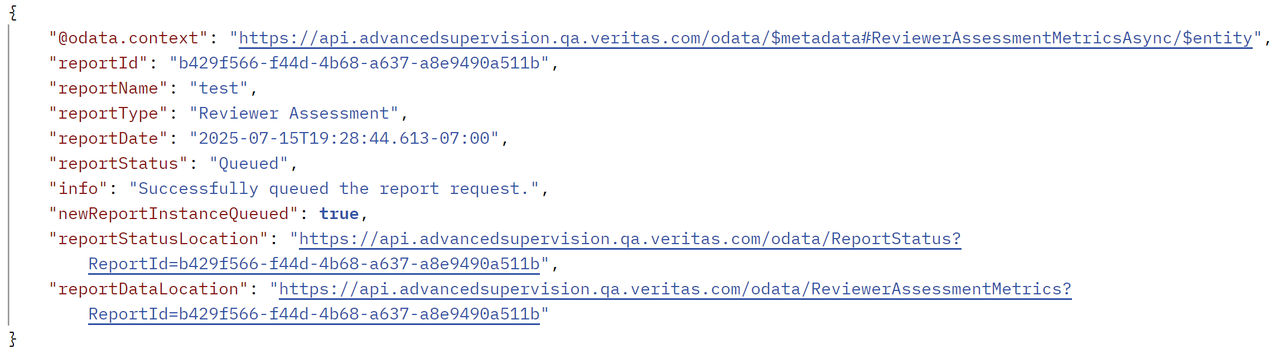
Sample response:
 |
|---|
Refer to the table below for details on the attributes included in the ReviewerAssessmentMetricsAsync API response.
| Name | Description |
|---|---|
| reportId | Displays report ID. It is generated upon successful execution of API. |
| reportName | Displays report name. It is generated upon successful execution of API. |
| reportType | Displays the report type as Reviewer Assessment . |
| reportDate | Displays the date of report generation after successful execution of API. |
| reportStatus | Displays report status. For more information on statuses, See Report Status API . |
| info | Displays a message if the report request has queued successfully or not. |
| newReportInstanceQueued | Specifies whether a new report generation request has been submitted or not. The Rate Limiting feature restricts submission of multiple requests with identical input parameters if attempted within one minute. |
| It returns the following values: | |
| True : The value is shown as True , if the new report request has been queued successfully. | |
| False : The value is shown as False , if the input parameters of the current request are identical to the parameters of the already submitted request within one minute , a new report will not be queued. As a result, the details of the existing report request are returned. | |
| reportStatusLocation | Displays a URL with report ID. |
| To view the status of this report, use the same URL. | |
| reportDataLocation | Displays a URL for the location of report data. |
| To access the report data, use the same URL. |
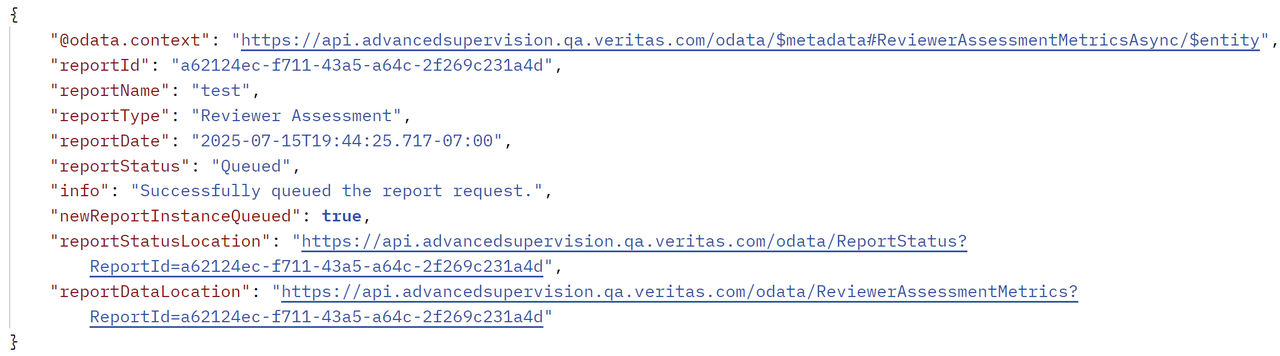
Scenario 2: A new request to submit the report when optional parameters are omitted
Sample request:
 |
|---|
Sample response:
 |
|---|
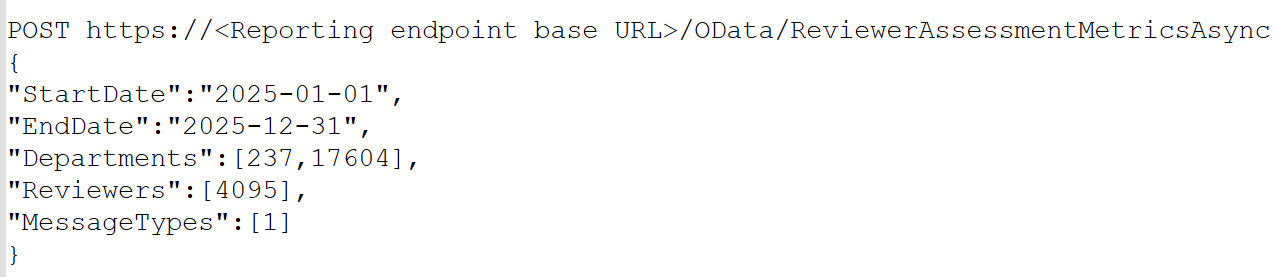
Scenario 3: A new request to submit the report when ReportName parameter is ignored
Sample request:
 |
|---|
Sample response:
 |
|---|
Scenario 4: A new request to submit the report when one of the dates parameter is ignored
Sample request:
 |
|---|
Sample response:
 |
|---|
-
Call the ReportStatus API to get the status of the Reviewer Assessment Metrics Async API report. See Report Status API.
-
Once the report is ready, call the Reviewer Assessment Metrics API to retrieve the report data from the asynchronous API. See Reviewer Assessment Metrics API.
Related information